Just an employee? Expense reports that write themselves, free in ChatGPT or ClaudeSee ExpenseOS™ for employees →Deploying AI agents? Give them a policy and a statementExpenseOS for Agents →
OverviewAgentic travel & expense management
For finance & HR teamsInstant reimbursement, benefits, clean books
For employeesKeep your points · get paid back
For AI agentsA policy and a statement for every agent
Employee expensesTravelSupplier paymentsBenefits cardsSoonMCP & chatSavings calculatorAgent spendEarly accessIndustriesComparePricingResourcesAboutFAQBook a demo
Employee expenses

Expenses your people don’t dread.

Employees snap receipts and get paid back within the minute, so every point stays theirs. You get clean coding and one number to settle, not a reimbursement run.

ExpenseOS · Employees · Expenses
Routed to you · over meal limit
DKDana KimClient dinner · Sona, Chicago$482.10
GL 6045 · Client mealsCC 310 · Sales✓ Receipt matched
✓Reimbursement released60s after approval · Dana’s wallet+$482.10
Posted · nothing keyedJE-4821 · Jun 6
6045Client meals · DR$482.10
2100Reimbursements payable · CR$482.10
Synced to your accounting system
Live recreation of the ExpenseOS finance workspace
Trusted with company money
Bank-grade securityHosted on AWSSSO / SAML + SCIMDual-admin controlsFull audit trails

Why it’s different

Fast for them. Tidy for you.

Paid back in seconds

The moment an expense clears it lands in the employee’s wallet, no two-week reimbursement run.

Every point stays theirs

Employees pay on their own cards and keep 100% of the miles and cashback; you just settle the work part.

AI files every receipt

Receipts are read, coded and matched automatically, so what reaches your books is already tidy.

The employee side

What your team sees.

Real screens from the ExpenseOS mobile app.

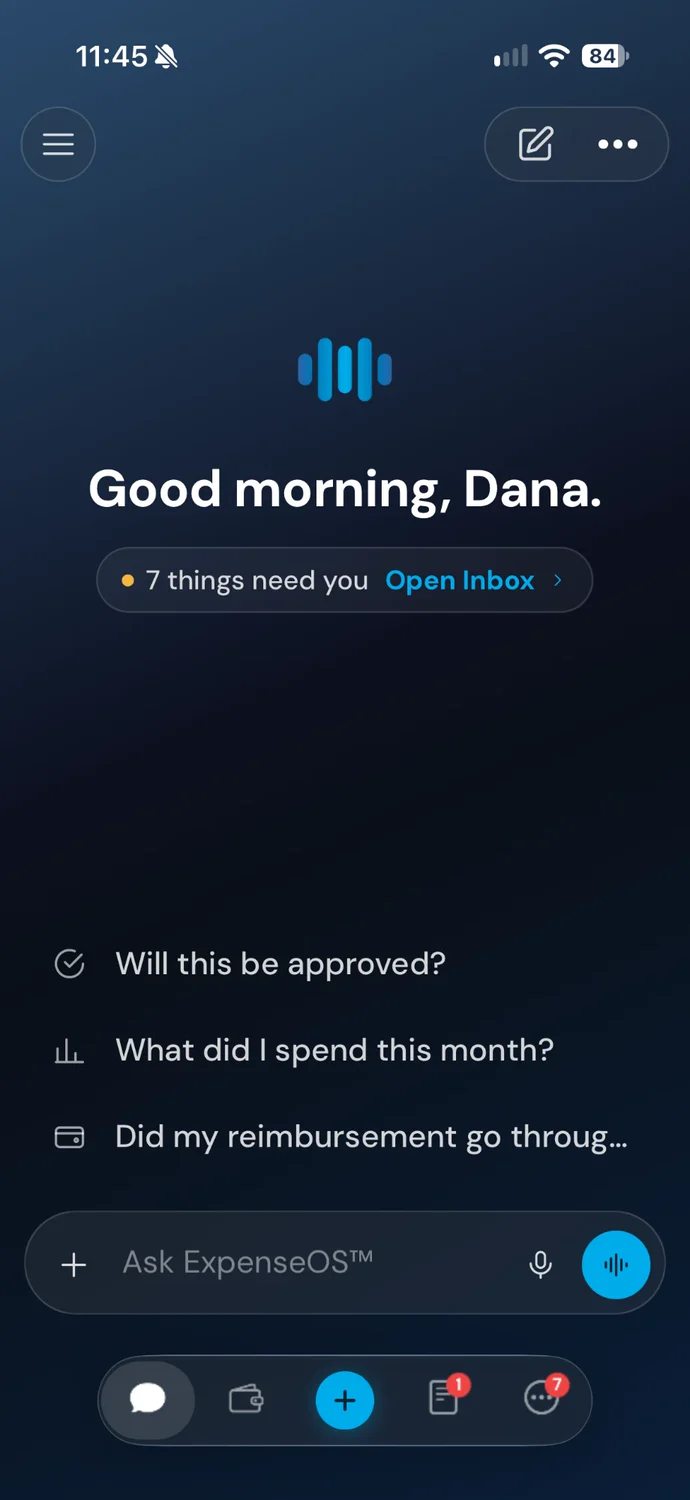
The ExpenseOS app's chat home: a good-morning greeting, seven things that need you, and questions to ask such as Will this be approved?
Ask first: “Will this be approved?”
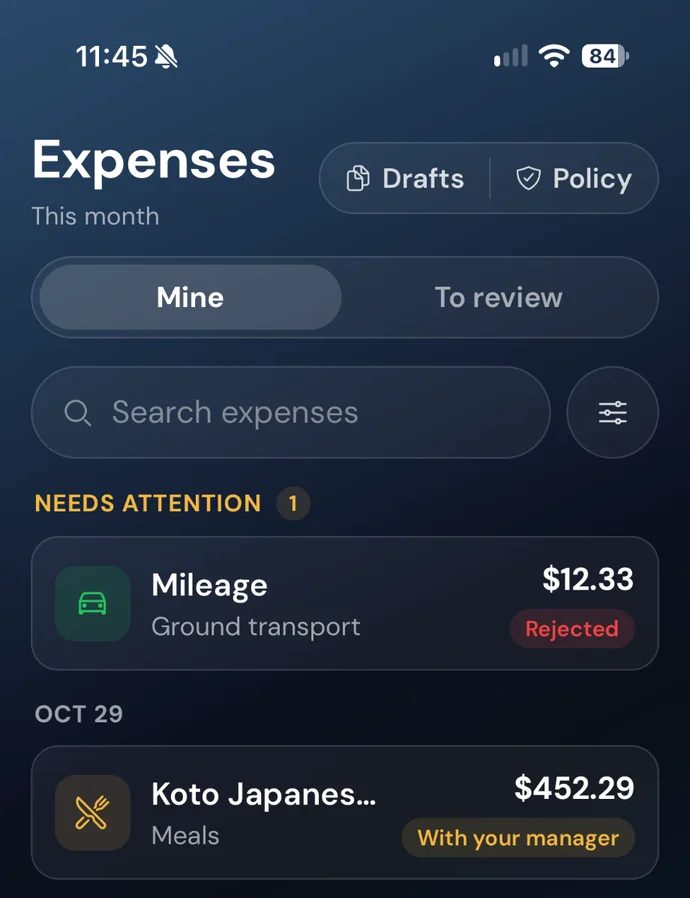
The ExpenseOS app's expenses for this month: one that needs attention, and a client dinner with the manager
Every expense, and where it stands
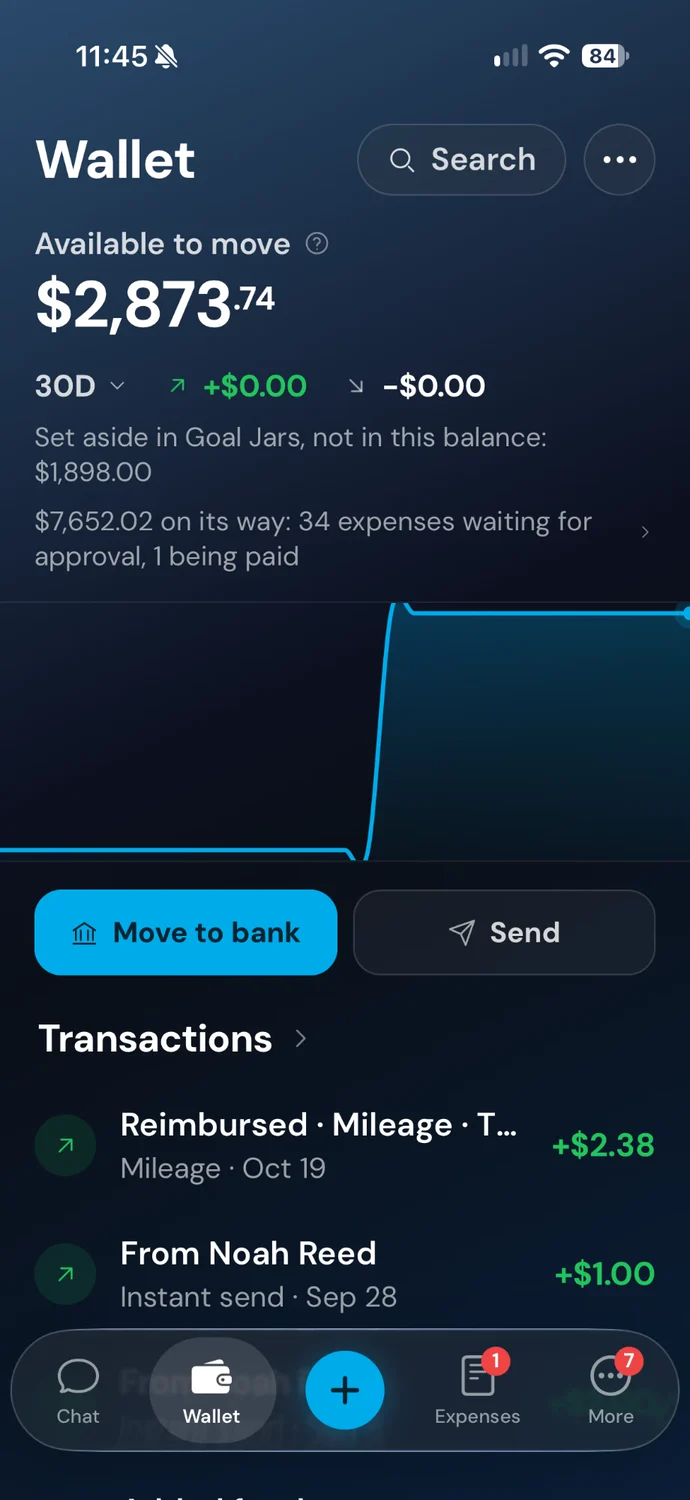
The ExpenseOS app's wallet: money available to move to the bank, and reimbursements on their way
Paid back to their own wallet

Your side of it

What finance sees.

No reports arrive. Coded expenses do.

Exceptions, not queues

In-policy spend clears itself against the policy you wrote. What reaches you is the over-limit, the unusual, the genuinely judgment-worthy.

One number to settle

ExpenseOS fronts reimbursements and you settle one weekly statement, a standard trade payable, never a credit line.

Books that post themselves

Every expense lands coded to account, cost center and project in QuickBooks, Xero, NetSuite, Sage Intacct or Microsoft Dynamics. Month-end becomes review, not repair.

ExpenseOS · Finance · Budgets
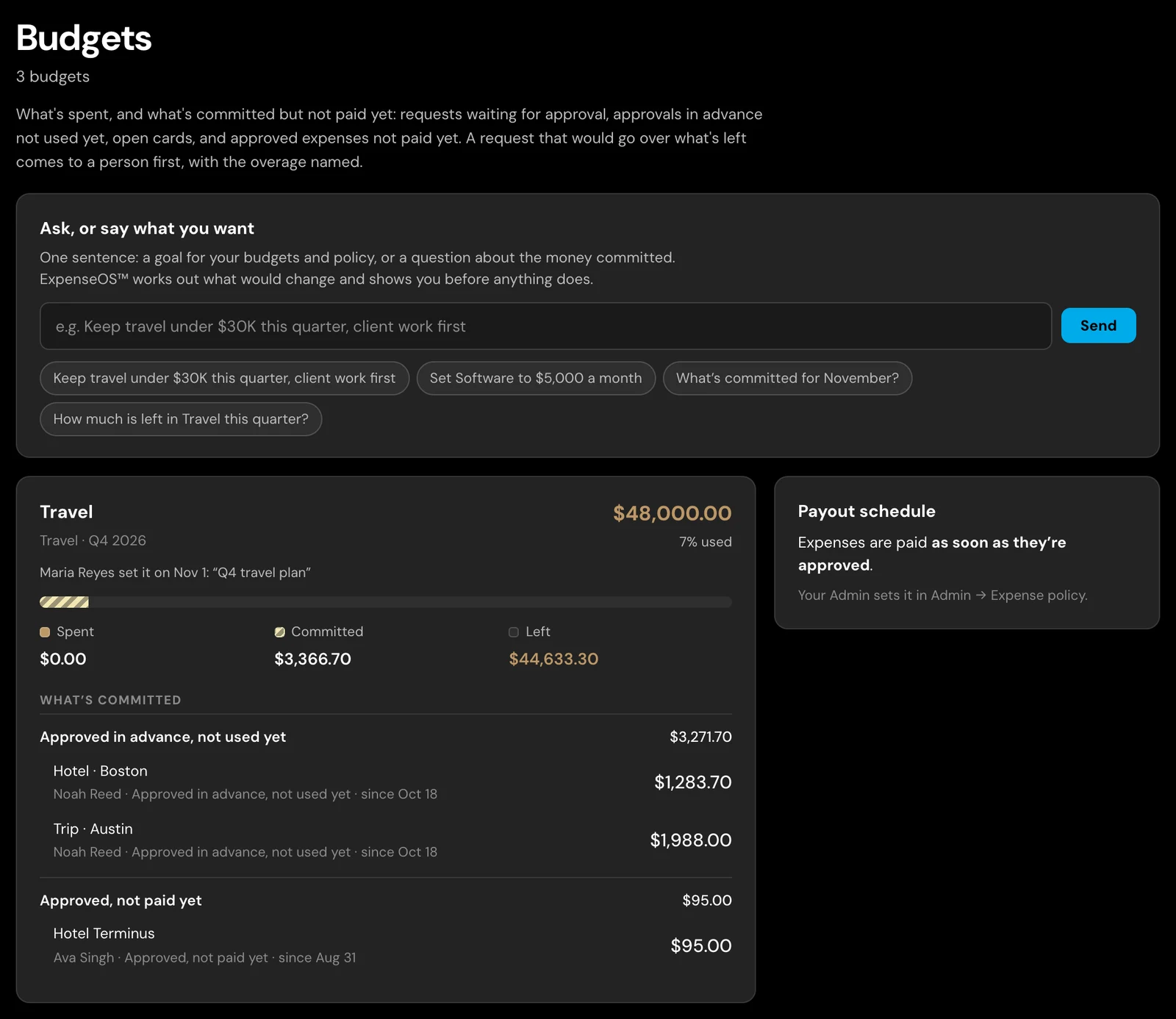
The ExpenseOS app's Budgets screen: a box to change budgets and policy in a sentence, and the Travel budget of $48,000 a quarter with what is spent, what is committed and what is left, each commitment listed

A real screen from the app: every budget with what’s spent and what’s committed but not paid yet, changed on screen or in a sentence. It all settles on one weekly statement.

The expense experience your team deserves

Their card. Their points. Reimbursed instantly.

Give your team instant reimbursement on their own card, let them keep every point, and finance the clean coding that follows, automatically. It’s the kind of everyday experience that helps you hire and keep the best people.

No spam. A short walkthrough mapped to your team.

Thanks, we’ll be in touch to schedule your walkthrough.

FAQ

Questions people ask

What makes ExpenseOS different from other expense management software?

Most expense software manages the report. ExpenseOS manages the payment. Employees spend on their own cards and keep the rewards, reimbursement lands about a minute after an expense clears policy, and the company settles one weekly statement: half a point on the money moved without a card, with cashback on card payments, rather than a per-seat license.

How much does expense management cost with ExpenseOS?

Half a point on payments made without a card: reimbursements, ACH supplier payments, contractors. Card payments earn cashback of 1% for life for founding customers who sign before the end of 2027, and 0.75% for customers who sign later, netted against one weekly statement. No software fee, no seats, no setup fees and no contracts, so the bill tracks usage rather than headcount.

How long does implementation take?

There is no card program to roll out, which removes the slowest part of most implementations. Teams often start by letting employees use the free expense agent in ChatGPT or Claude while finance evaluates the platform.

Does it replace our accounting system?

No. ExpenseOS codes expenses and hands clean records to the system you already use. It sits in front of the ledger rather than replacing it.

How does this affect our cash flow?

Employees are paid in about a minute and the company settles one weekly statement, a standard trade payable, so the employee stops financing the business and the company never funds a card balance up front.

Further reading: How instant reimbursement works · How settlement works